What is Mijn NS?
Mijn NS lets you manage all your details, journeys and settings in one place. Discover all the benefits.

This is Mijn NS
Mijn NS is your personal space where you can view all your journeys and costs, manage your details, and take care of several things yourself.
Here is how to make the most of Mijn NS:
- Create an account
- Log in to Mijn NS in the NS app (or on the website)
- Add a card: your OV-chipkaart, OV-pas or payment card
How to create an account
Mijn NS is your personal NS space; this is also known as an account. Follow the steps below to set up your account straight away.
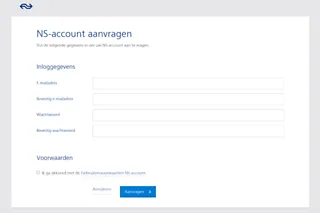
- Go to https://login.ns.nl/personal/sign-up-unp
- Enter your details
- Agree to the terms and conditions
- Click ‘Create account’
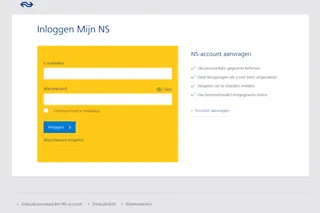
You can now log in to Mijn NS using your email address and password:
- Enter your email address
- Enter your password
- Click ‘Log in’
Discover all the benefits
Make sure to add your OV-chipkaart, OV-pas or payment card at all times. This helps you get the most from Mijn NS.
View your journeys
Your journey overview shows your completed journeys and their costs. It may take a moment before these details appear, especially if you travelled with another carrier.
View your invoices
See all your invoices in one place, showing all the costs charged to your card that month—for both your season ticket and any individual products.
Claim a refund
Did you forget to check out or experience a delay over thirty minutes? Claim a refund via Mijn NS.
Update your details
If you want to update your address or other personal details, log in to Mijn NS and handle it immediately under Details and preferences. In the app, these settings are found under More > Personal details (under Account) > Details.
Give or receive co-travel discount
As a season ticket holder, you can offer co-travel discount to fellow travellers via Mijn NS. You can also activate a co-travel discount you have received.
Essential for on the go
Log in to Mijn NS via the NS app so you always have all your information at hand. We can send you a reminder if you forget to check out, you can easily switch travel classes, and view your balance anywhere.