How to plan a journey with a mobility aid
Travelling with a mobility aid requires good preparation, but the NS Reisplanner makes it easy to find a route that suits your situation. In just four steps you can see straight away whether you can travel completely independently or whether you need to book NS Reisassistentie in advance.

Step 1
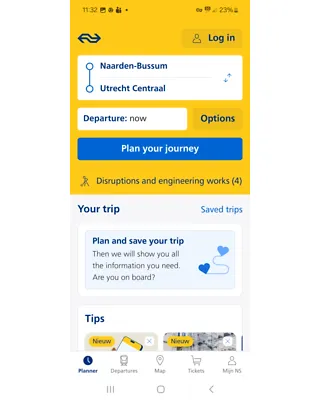
Plan your journey in the NS Reisplanner and go to ‘Travel options’
Step 2
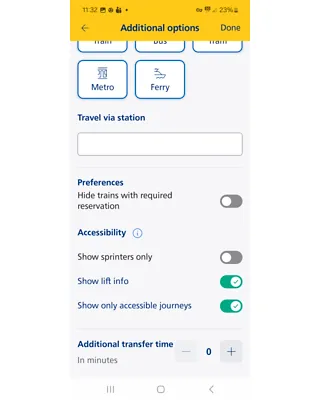
- Turn the ‘Show accessible journeys only’ toggle to green
- The ‘Show lift information’ toggle is switched on automatically
- Then close the screen using the blue button or tap ‘Done’
Step 3
- Select the time you want to travel
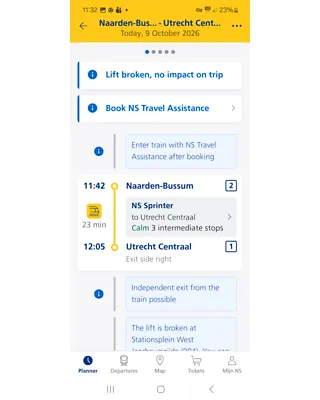
- At the station you will see whether you can get on and off independently or if NS Reisassistentie is needed
- If a lift is out of service during this journey, the NS Reisplanner will also show that
Step 4
Sometimes you can travel completely independently with your mobility aid, and sometimes you must use NS Reisassistentie for part of your journey.
- The NS Reisplanner indicates: Independent boarding possible and/or Independent alighting possible:
- You can travel independently with a mobility aid.
- The NS Reisplanner indicates: ‘boarding or alighting with NS Reisassistentie after booking’:
- You need NS Reisassistentie to make this journey. You can book NS Reisassistentie up to one hour before departure online, via the NS app or by phone on 030-235 7822. To book online you need a Mijn NS account. You only need to set this up once.
See more information about NS Reisassistentie and how to request it.
Plan each journey again
Important: always re-plan your journey using the ‘Show accessible journeys only’ toggle. This way you will always know whether you can get on or off the train independently or if you need NS Reisassistentie.